

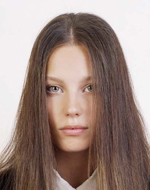
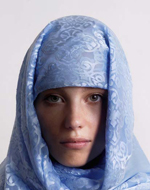

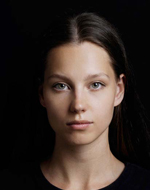
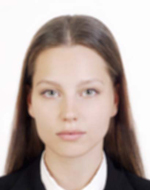
US Visa Photo: DS-160 & DV app icon

US Visa Photo

DS-160, DV Lottery & 2×2 inch print

Create visa application photos on your iPhone based on U.S. Department of State requirements. Supports DS-160 online upload (600×600 px JPEG), DV Lottery entry, and 2×2 inch print sheets for in-person interviews.

Download on the App Store

Key features

600×600 px guidance

Face positioning guide helps you align your photo for DS-160 and DV Lottery upload, based on official U.S. photo composition standards.

Three application types

Choose DS-160 online application, DV Lottery entry, or 2×2 inch print. Each mode outputs the correct format automatically.

2×2 inch print sheets

Generate a 4×6 inch or L-size print sheet with two 2×2 inch photos ready for photo lab printing.

On-device processing

Photo import, face detection, adjustments, and export all stay on your iPhone. Your photos are never uploaded to any server.

240 KB JPEG output

Auto-compressed JPEG under 240 KB with no EXIF metadata, ready for DS-160 or DV Lottery online upload.

Pre-submission checks

Review face position, head size, background, and glasses before saving. The app handles what it can and reminds you about the rest.

Pricing

Export plan

$4.99

One export

  • 600×600 px JPEG for DS-160 / DV
  • 2×2 inch print sheet
  • Preview before you pay

Photo checklist

Even a slightly non-compliant photo can be rejected during your application. Check these points before saving.

  • Use a square photo (600×600 px) with only the applicant in the frame.
  • Taken within the last 6 months. Face the camera directly with a natural expression.
  • White or off-white background with no shadows.
  • Both eyes open and clearly visible. No glasses, no hair covering the eyes.
  • No beauty filters, AI face modification, heavy retouching, or mirrored images.

Size and composition

These are the official composition requirements from the U.S. Department of State. Keep face position and margins close to this template.

Digital photo composition (600×600 px)

FormatJPEG
Size600 × 600 px
File size≤ 240 KB
Color24-bit sRGB
Head height50–69% of image
Eye height56–69% from bottom
BackgroundWhite / off-white
GlassesNot allowed

Print photo size (2×2 inch / 51×51 mm)

Size2 × 2 inch (51 × 51 mm)
Head height25–35 mm (1–1⅜ in)
Eye height28–35 mm (1⅛–1⅜ in)
Head width15–22 mm (⅝–⅞ in)
Top space3–5 mm (⅛–¼ in)
Chin to bottom≥ 7 mm
PaperPhoto paper, glossy
PrintActual size / no scaling

Source: U.S. Department of State — Bureau of Consular Affairs

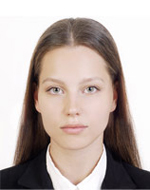
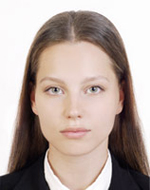
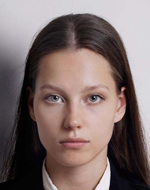
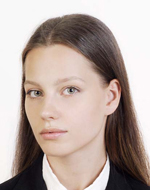
Examples that are OK

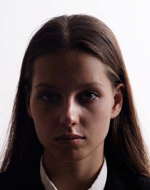
The person faces forward, background is white, and the face is clearly visible with a natural expression.

Acceptable photo example 1
Forward-facing with a white background.
Acceptable photo example 2
Face is clear with no strong shadows.

Common examples that are not OK

These are common reasons a photo may be rejected by the U.S. Department of State.

Off-center photo
Face is too far from center.
Photo with shadow on the background
Background shadows make the outline harder to see.
Side-facing photo
You must face the camera directly.
Tilted head photo
Keep your head straight and level.
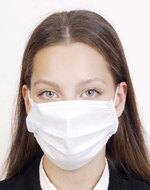
Photo with face partially covered
Your full face must be visible.
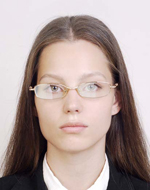
Photo with glasses frame over eyes
Glasses are not allowed since November 2016.
Photo with glare on glasses
Remove glasses before taking your photo.
Photo with hair covering the eyes
Hair must not cover your eyes.
Photo with cloth or shadow on face
The face must be fully visible with no obstructions.
Photo with unnatural expression
Use a natural, neutral expression.
Photo with background too dark
Background must be white or off-white.
Blurred photo
The photo must be sharp and in focus.
Photo with shadow on the face
Even lighting with no harsh shadows on the face.

About editing

The U.S. Department of State does not accept photos that have been digitally altered to change your appearance. This includes enlarging eyes, smoothing skin excessively, modifying facial features, removing moles or scars, or applying AI-generated changes. Use the app for background replacement and brightness adjustment only.

Official guidance U.S. Department of State Photo Requirements

FAQ

What are the photo requirements for DS-160?

The photo must be a square JPEG, 600×600 pixels, under 240 KB, in sRGB color with a white or off-white background. Your head should be 50–69% of the image height, eyes between 56–69% from the bottom, taken within the last 6 months, facing forward with a natural expression. Glasses are not allowed since November 1, 2016.

What are the photo requirements for the DV Lottery?

DV Lottery photos must be exactly 600×600 pixels, JPEG format, under 240 KB, with a white or off-white background. The composition requirements are the same as DS-160: head height 50–69% of image, facing forward, no glasses, neutral expression, taken within the last 6 months.

What is the difference between DS-160 and DV Lottery photos?

Both require the same 600×600 px JPEG under 240 KB. The DV Lottery emphasizes the exact 600×600 pixel requirement more strictly. DS-160 technically accepts 600–1200 px, but 600×600 is the safest size that works for both applications.

Can I wear glasses in my visa photo?

No. Since November 1, 2016, glasses are not allowed in U.S. visa photos. Please remove glasses before taking your photo. If you must wear them for medical reasons, include a signed doctor's statement with your application.

What background color is required?

A white or off-white background is required. This app provides automatic background replacement to white. Photos with colored, patterned, or dark backgrounds will be rejected.

What photos are commonly rejected?

Common rejection reasons: wrong dimensions, file too large, face off-center or wrong size, shadows on face or background, glasses, hair covering eyes, dark background, blurry image, unnatural expression, head tilted, or excessive digital retouching.

Does this app guarantee my photo will be accepted?

No. This app helps you create a photo that meets published U.S. Department of State specifications, but final acceptance is determined by the reviewing authority. Requirements may also change, so always check the latest official guidance.

Are my photos uploaded to a server?

No. All photo processing, face detection, background replacement, and JPEG export happen entirely on your iPhone. Only App Store billing uses the network, and it never includes your photo data.

How do I print the 2×2 inch photos?

The app generates a 4×6 inch print sheet containing two 2×2 inch photos. Save it to your photo library and print at a photo lab, drugstore, or home printer. Use photo paper at actual size with no scaling.

What about children's visa photos?

The same requirements apply to children: white background, facing forward, eyes open, no glasses. For infants, lay the child on a white sheet and photograph from above, or use a car seat with a white cloth draped over it.

Create your U.S. visa photo now

Capture and preview for free. Pay only when you save.

Download on the App Store (free)

Need help?

Contact us about usage, exports, purchases, or website information.